Web Functional Testing
Success of any application highly depends on its features and whether they are functionally correct. A web application with broken links or inappropriate content can lead to huge problems. We will try to understand few important aspects with Web Functional Testing. Following document will help you understand what Web Functional Testing means, why its required and how you can successfully implement Functional Testing for your web applications using AppPerfect in Automated manner. The important benefits of Automated Web Functional Testing includes, higher test coverage levels, greater reliability, shorted test cycles, ability to do multi user testing at no extra cost, all resulting in increased levels of confidence in the web application and its successful deployment.
What is Web Functional Testing?
All software are designed and developed to meet and satisfy certain functional requirements. A functional requirement may be technical, business, or process based. Functional Testing is the process by which expected behavior of an application can be tested.
Web Functional testing is a process to test Web applications to detect if your web application is functionally correct. Web Functional testing involves carrying set of tasks and comparing the result of same with the expected output and ability to repeat same set of tasks multiple times with different data input and same level of accuracy. Implementing functional testing for your application early in the software development cycle speeds up development, improves quality and reduces risks towards the end of the cycle. Web Functional Testing can be performed both manually with a human tester or could be performed automatically with use of a software program.
Every software organization tests its softwares, still the end product always have some issues left. Testing team tries their best to find all the bugs before release of the software but still there are issues left in the product and they often re-appear as new modules are added to the software. Even the best of manual testing process struggle to deliver an effective, efficient, accurate and increased test coverage.
Manual testing is often error prone and there are chances of most of the test scenarios left out. Also with the project in development phase where source code changes appear every other day, manually keeping up with the pace to test each and every feature is a difficult task. More often then not the newly added features would bring regression along with them, so to accurately cover all the old test cases manually is very time consuming and error prone. Moreover testing with different hardware configurations and operating systems makes job more difficult.
Automated Web Functional testing is use of software program to detect if your web application is functionally correct. Automated Functional testing includes automating manual testing tasks which are mostly time consuming and error prone. Web Functional testing is a more accurate, efficient, reliable and cost effective replacement to manual testing. Web Functional testing involves carrying set of tasks automatically and comparing the result of same with the expected output and ability to repeat same set of tasks multiple times with different data input and same level of accuracy. Implementing functional test for your application early in the software development cycle speeds up development, improves quality and reduces risks towards the end of the cycle.
Automated Web Functional testing is a solution to all the issues raised with Manual functional testing. An Automated Web Functional Testing tool can playback all the recorded set of tasks, compare the results of execution with the expected behavior and report success or failure to the test engineers. Once the Web Functional tests are created they can easily be repeated for multiple number of times with different data sets and can be extended to cover additional features at a later time.
Most of the software organizations consider Web Functional testing as critical to their web testing process and there are many things which should be considered before selecting an Automated Web Functional Testing tool. A company can make great strides using functional test automation. The important benefits include, higher test coverage levels, greater reliability, shorted test cycles, ability to do multi user testing at no extra cost, all resulting in increased levels of confidence in the software.
Functional Testing Web Application with AppPerfect
AppPerfect offers Web Functional Testing solution in form of AppPerfect Web Test. AppPerfect Web Test is found to be most affordable, cost effective, efficient, reliable and accurate solution by its customers. We will now try to understand how you can successfully implement Automated Functional Testing for your web application using AppPerfect Web Test :
Smartly Designing Test Scripts for Web Functional Testing :
One of the most important aspect in successfully implementing Functional Testing is smartly designing the test cases. Before recording your test scripts you should be ready with the Test Plan for same. You should have the list of modules documented which you would like to test in your web application. Once you have figured out the modules to test, pick each module and list down the features to test for that module, Once you have identified the features, design test cases for each of the feature to test. For each of the test case, define the data set with which you will like to parameterize your test case. Also define the validations you will like to perform for your test case.
Once you are ready with the test plan, you can start creating Test Scripts for each of the identified modules.
- Creating new project is an easy one step process. Just start AppPerfect Web Test product and select File -> New.. menu option to create a New Functional Testing project. For details on New Project creation refer to Creating a New Project chapter. For details on configuring project properties refer to Setting Project Properties chapter.
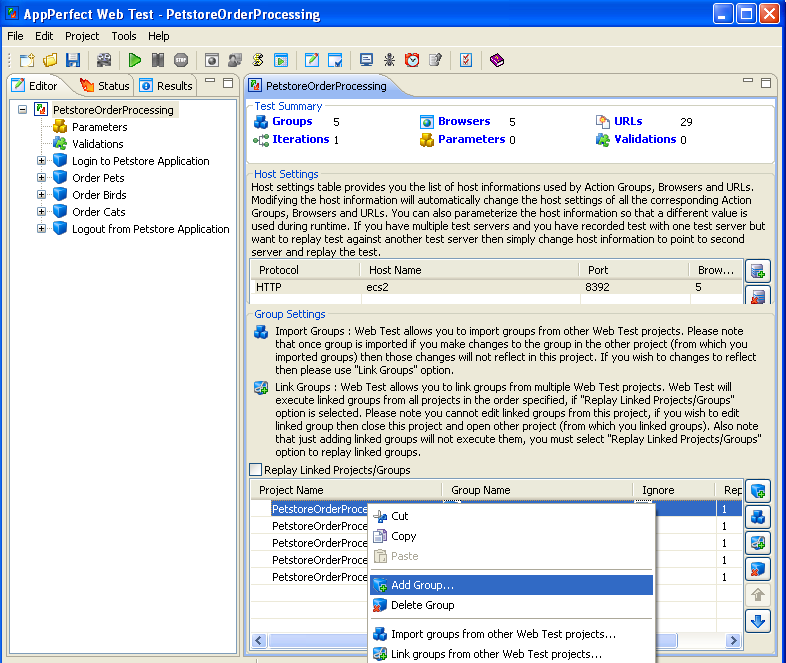
- You can now start creating New Groups for each of the feature you have identified in the current module under test. To create a new Group just select Project Node in the Editor tree, and right click and select the option Add Group... from the popup menu. Provide descriptive name for the group clearly stating what feature this group is going to implement. For details on test editing refer to Editing Web Test chapter.
- This way you can functionally structure your test scripts where each test project will represent one functional module for your application and each Group in the Test Project will represent one test case or feature in the module to test. Properly structuring and designing test scripts early in testing cycle will help maintenance process easy over longer run. Properly designing and grouping test cases in different groups will help increase re-usability of groups across different test scripts. In case some of the actions are common and are required to be processed in new test scripts, you can just link or import already existing groups instead of re-recording them all over again in new scripts. For details on Linking / Importing Groups refer to Link Projects chapter.
Easy-to-use Test Recorder helps Automating Tests instantly :
AppPerfect's Web Functional Testing tool does not require programming or scripting skills and allows even non-technical and inexperienced testers start automating tests instantly. We provide easy to use Test Recorder which records each step as you browse through your application. All we need from you is to provide us with starting URL to start with and choose a web browser with which you need to record. Test Recorder will take care of launching your application in Web Browser and you are all set to record your test case. Just do the actions you intend to record and Test Recorder will capture all the actions you perform on your web application.
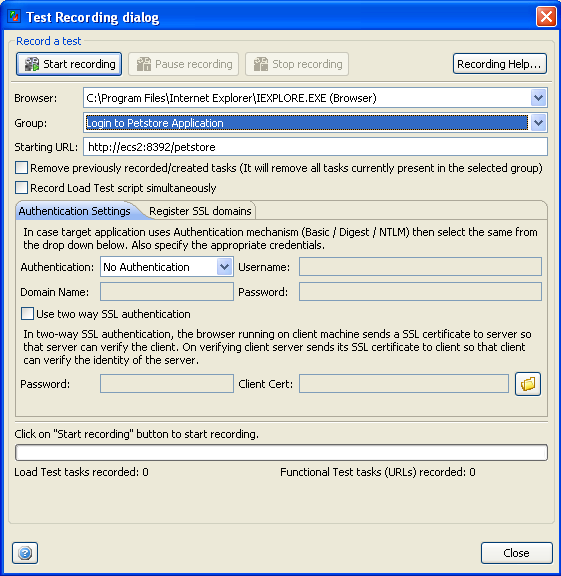
- To start recording test just select the Project -> Record Test... menu option. This will launch the Test Recording dialog. You can select the Web browser you need to record your test with, select the Group in which you need to record and provide the Starting URL for the Group.
- Click on Start Recording button and you are ready to record your test. AppPerfect will launch the Web Browser for you with your web application loaded in it. Browse through the steps you intend to record on your application and test recorder will take care of rest. For details on Test Recording refer to Recording a Web Test chapter.
- Once you are done recording, you can browse though the recorded test in Editor view. For details on test editing refer to Editing Web Test chapter. AppPerfect's Test Recorder takes care of recording all the steps you performed on your application along with all the pages you visited in your web application. The recorded test script is object-based, making functional testing stable and increases the usability of recorded scripts as your target application evolves / changes. Application simulates recorded actions by finding the elements based on recorded attributes of the element like id, name etc. rather than using screen-coordinates. AppPerfect also provides support to simulate Low-level keypress and mouse events if required.
As Internet users are growing the web developers are making the Web UI more intuitive. With lots of web technologies and third party controls available need for a functional testing tool which supports testing of different kind of web technologies and controls is must. AppPerfect's Web Functional Testing solution provides support for recording on all commonly used controls including Flash, Flex, Applets, .Net, Form controls etc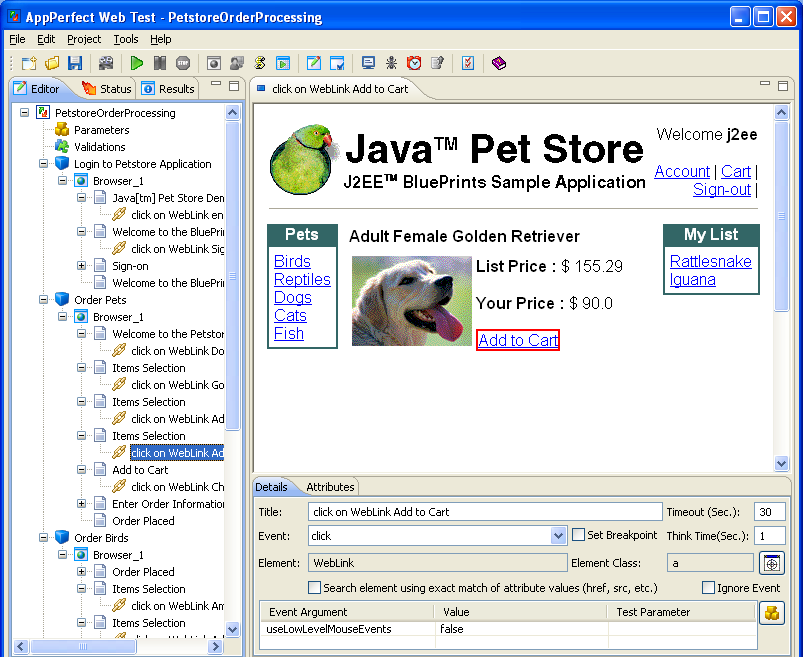
Extensive Validation and Custom Scripting support :
AppPerfect's Functional Testing tool provide extensive support for validations. Once you are done recording, you can edit your Test cases to perform required Validations. You can add validation for any page or element in recorded test.
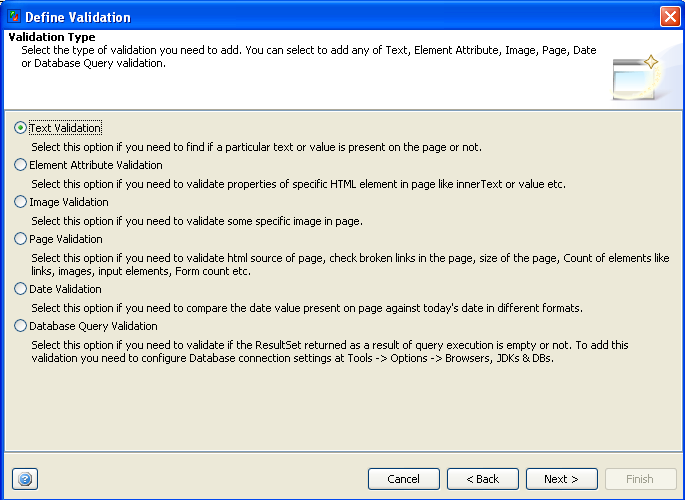
- Select the Validations node in the Project Editor and on right hand side you will find a button to Add Validation.... Click on that and it will launch a wizard to add validation. You can select to add validation for all the pages in Test or can select any individual URL and add validation for that. For details on Test Validations refer to Validations chapter.
Following kinds of validations are supported in AppPerfect's Functional Testing solution:- Page validation : In case of Page Validation you can validate size of the page, count of elements on the page, links , images, input elements, forms etc. can be validated.
- Text validation : To find if a particular text or value is present on the page or not you can use this validation
- Attribute validation : This type of validation is useful in case you need to validate properties like innerText or value etc. of specific HTML element in page
- Date validation : Using this kind of validation you can compare the date value present on page against today's date in different formats.
- Database Query validation : Here you can validate if the result set returned as a result of query execution is valid or not.
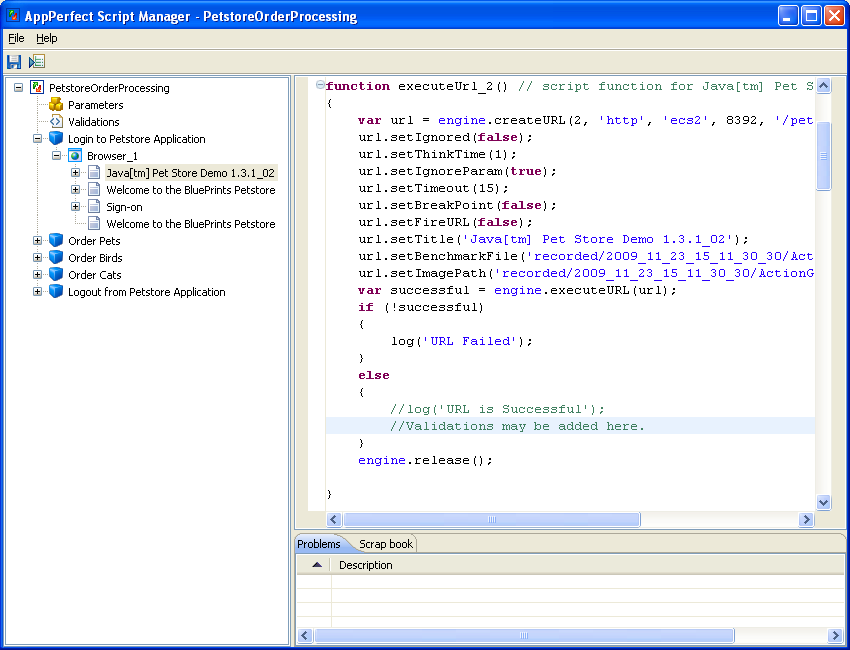
- Custom Validation Support : For any functional testing tool, one of the important criteria is support for customization. Apart from validations explained above, In case you need to perform any custom validation on Web Page you can do so using scripting. AppPerfect stores recorded test as JavaScript and one can add custom code to the test script to perform any custom URL or database validation. We support custom scripting apis, using which you can parse the response and fetch appropriate fields from the response page and validate it against the required value. You can also use scripting apis to fire any database query and perform the required validation by fetching the required data using the result set. Script Editor can be invoked using Project -> Script Editor.. menu option. Please refer to Customizing Test Script chapter for more details.
Extensive support for Parameterization :
Most common requirement in functional testing is to perform same set of steps with different input parameters and see if the results are desirable. AppPerfect's Functional testing solution supports extensive support for test parameterization, wherein you can run same script over and over again with different data set each time. AppPerfect offers extensive parameter-management. Parameter selection and testing with various parameter values is completely automated. Parameter values are passed either via the URL itself or via the event arguments and attributes. Parameters are stored as name-value pairs, making it intuitive for application developers and testers. Then, depending on the number of iterations for your project, multiple parameter values can be tested, with options to select parameters sequentially or randomly. For more details on Test Parameterization refer to Parameters chapter.
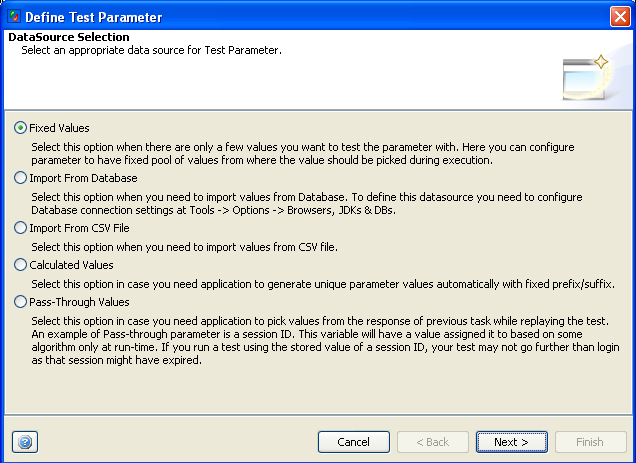
- Select the Parameters Node in the Editor tree and on right hand side you will find button to add a New Test Parameter for your test. This will launch the Parameterization wizard which will help you creating and associating data source in your test. You can choose data source to be Fixed pool of values, Database, records in CSV file or can derive it from calculated values.
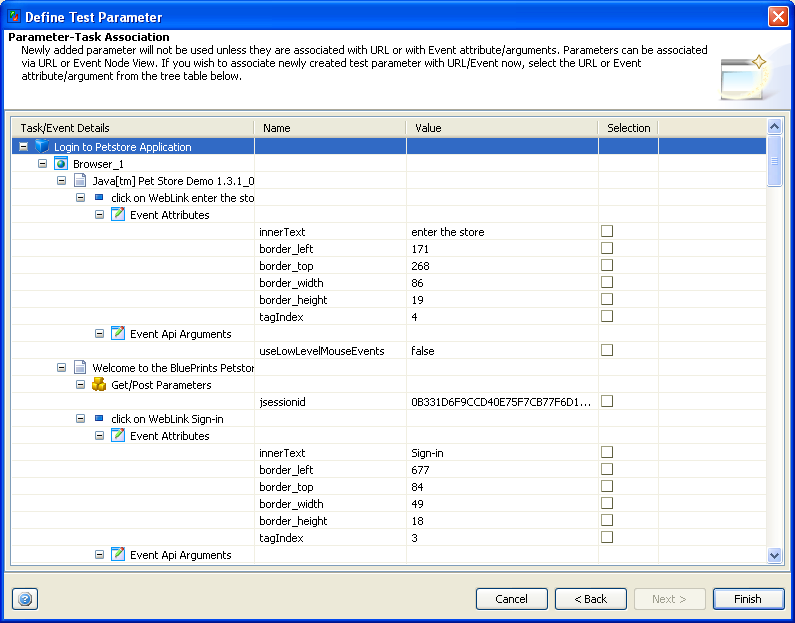
- As last step of Parameter Creation Wizard, you can associate Test Parameter with URL parameters, attributes/properties of recorded element or can also associate parameter with arguments in event apis. Say for example in case you need to run test with different input values for set/type events, then you can parameterize the "text" argument for that particular event in this case.
Test Execution with detailed Result Analysis :
Once the test is completely designed you can execute it to Functional Test your application over and over again as your application evolves to check for any regression or discrepancy in the application since test was recorded. AppPerfect generates extensive reports for each execution step in your test. To replay the test select the Project -> Run.. menu option. AppPerfect will launch the browser of your choice and will start replaying each of the step in your test in automated manner. At the end of test execution you can view the detailed results of each of the execution step and export them to HTML, PDF etc. formats. In case of failure, you can pass on these exported reports to your development team for further analysis.
For more details on Test Execution and Results refer to Running a Web Test chapter.
Cross Browser Testing :
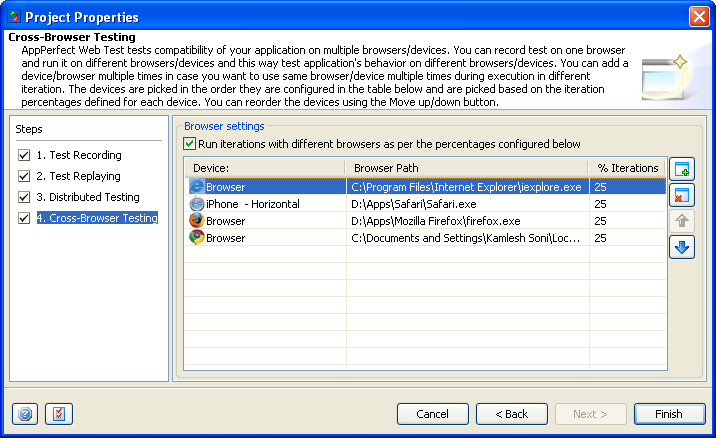
AppPerfect's Functional Testing solution can help you test compatibility of your application on different Web browsers like Internet Explorer, Firefox, Safari, Chrome etc. at same time. You can record test on any one Web browser and run it on different Web browsers and this way test application's behavior on different browsers without need to re-record test on multiple browsers. Refer to Cross Browser Testing chapter for more details.
Web Functional Testing can Run Unattended in Automated Manner:
With AppPerfect's Web Functional Testing solution you can run complex and lengthy tests unattended. Tests can be scheduled to run overnight and engineers can analyze the results of execution next morning. As a result you save time and improve efficiency and can concentrate on other important tasks while scheduled tests run in background. To schedule tests you require AppPerfect Test Manager product. Once you have Test Manager installed you need to first configure Web Test to enable connection to Test Manager server. To configure the Test Manager connection select Tools -> Options -> Server Connections -> Test Manager Settings and provide the host:port information for the machine where Test Manager is installed. Once you have connection configured you can save the Web Test Project to Test Manager using File -> Save in Test Manager menu option. Once test is saved to Test Manager you can schedule Test Execution using Tools -> Schedule Project menu option.
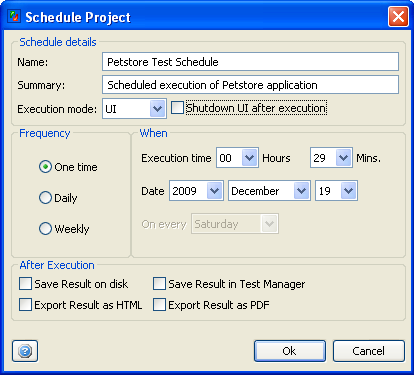
For details on creating and executing Test Schedules using Test Manager Web-UI refer to Schedules chapter.
Distributed Functional Testing :
AppPerfect's Functional Testing solution allows you to distribute your test over multiple machines to simulate real-world conditions while testing web or intranet sites, client-server and other multi-tier applications. Testers can easily configure the list of machines on which Test Script should be executed. Functional testing results from all machines are accumulated into a single report for easier analysis. To configure execution of functional test on multiple machines select Project > Properties menu option. It will launch the Project Properties wizard. Select the "Distributed Testing" step where you can configure to run Test script simultaneously on multiple machines. Distributed testing is performed using Web Test service running on the remote machines. Hence, you need to have AppPerfect Web Test installed on all the machines where you desire to execute the test. Web Test uses HTTP protocol to connect to Web Test service on remote machine. To connect to this service, you need to select Protocol (Default is http), provide Host name or IP address of the remote machine, port on which service is listening (Default is 8854) and Context Path (Default is AppService). Normally, you will need to specify only the host name or IP address of remote machine and other fields will take only the default values.
Web Functional Testing with Team Sharing Support:
Test Engineers can share the Functional test scripts and results with different members in the team. Functional Scripts can be shared with developers which they can use to run after every source change to check for any regression. AppPerfect supports integration with Subversion (SVN) version control system. For details on integration with Subversion server refer to Team Server Configuration chapter.
IDE Integration Support:
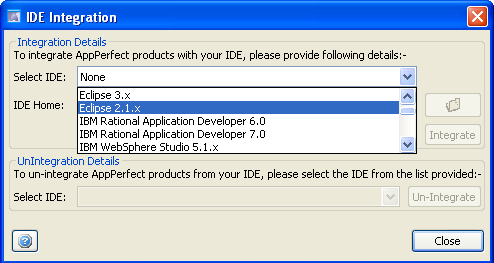
IDE Integration is a highly useful feature in AppPerfect products. Once product is integrated in IDE you can start IDE and can execute Functional Testing of your Web Projects from within IDE. You can integrate AppPerfect applications with Eclipse, IBM Rational Application Developer (RAD), NetBeans, IntelliJ Idea, JBuilder, Oracle JDeveloper and BEA Workshop studio.
Select Tools -> IDE Integration menu option to integrate with any of the supported IDEs. For details on integration with IDE refer to IDE Integration chapter.
Integrate Functional Testing with your Daily Build Process with ANT Script and Command line Support:
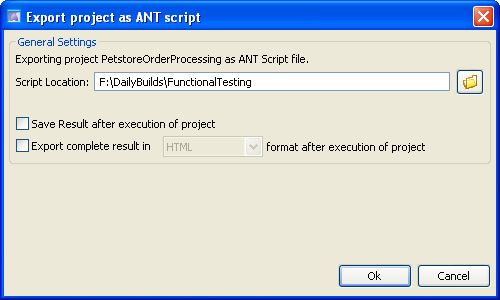
AppPerfect supports integration with build process smoothly. You just need to export Functional Test project as ANT Script or Command Line script and then you can execute these exported scripts from your build process. This way you can ensure that each build is functionally tested before final deployment. To Export project as Ant Script select Tools -> Export Project as ANT Script... menu option. For details on ANT script execution refer to ANT Script Execution chapter.
Conclusion :
Its practically impossible for a human tester to repetitively cover all the test cases with same amount of accuracy over and over again. AppPerfect's Web Functional testing Solution has ability to perform complex set of tasks repetitively with same amount of accuracy every time which makes it both cost effective and reliable solution for functional testing.
Once a test case is recorded it can be played back multiple times with different data sets. Its possible to validate output with different data inputs using the same test case by parameterizing the user input. Moreover tests once recorded can be reused and extended to cover more features and test cases as your application evolves,
AppPerfect's Web Functional testing solution is platform independent. Functional Tests recorded on one platform can be used to play back over different operating systems and hardware configuration and across multiple browsers. AppPerfect Web Test is found to be most affordable, cost effective, efficient, reliable and accurate Functional Testing solution by its customers. In case you have not yet tried AppPerfect Web Test, Download Now and give it a try today.